• Home
  • IT Support
  • General Office
  • QX Support
Method Studio SupportMethod Studio Support
  • Home
  • IT Support
  • General Office
  • QX Support

Revit: Can’t create new local model after moving central model to a new server

April 16, 2024 BIM Apps, IT, Revit

Issue:

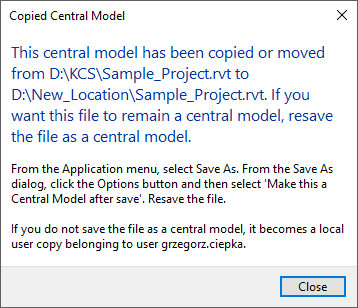
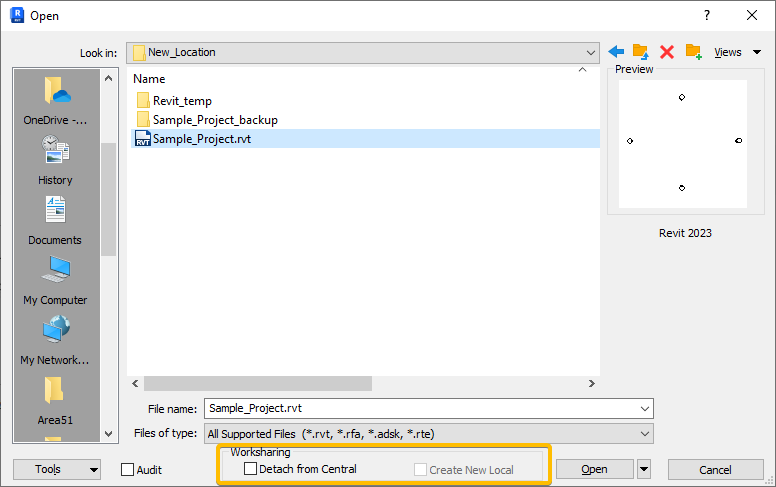
After moving the Revit central model to a new location or renaming the server, the Create New Local checkbox is grayed out and a message appears “The central model has been copied or moved”.
Causes:

When a Revit model is moved to a new location, it must be resaved as a central model.

Solution:

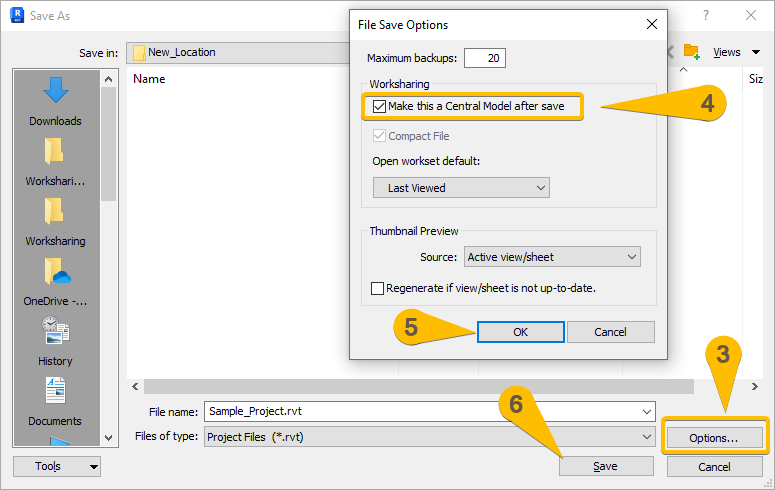
To save as a new central model:

  1. Open the Revit model.
  2. Select File > Save As > Project.
  3. In the Save As dialog, select the Options button.
  4. In the File Save Options dialog, check if “Make this a Central Model after save” is enabled.
  5. Select OK.
  6. Select Save.

You also might be interested in

Bluebeam Revu 21: Exporting & Importing User Settings

Apr 1, 2024

The Preferences dialog box enables customization of Bluebeam Revu settings. This section[...]

Cyber Security: Data Brokers – What Is Your Data Worth?

Apr 19, 2024

A data broker (also known as an information product company) is an[...]

Microsoft Excel: How to add an always visible Top Row in a table

Jun 3, 2024

To add an always-visible title, you can place it in[...]

Contact Us

We're currently offline. Send us an email and we'll get back to you, asap.

Send Message

Pages

  • Admin Docs
  • General Office
  • Home
  • IT Support
  • QX Support

Categories

  • General Office
    • Food
    • Supplies
  • IT
    • Ajera
    • Barracuda Email Gateway
    • BIM Apps
      • Autocad
      • Bluebeam / Revu
      • Enscape
      • PyRevit
      • Revit
      • SketchUp
    • Computer Hardware
      • Monitors/Displays
      • Printing & Scanning
    • Cybersecurity
    • MacOS
    • Mobile Devices
    • Networking
    • Office 365
      • Excel
      • Microsoft Authenticator
      • OneDrive
      • Outlook
      • Teams
    • PDF
    • VPN & Remote Connection
    • Windows
      • Shortcuts

Recent Posts

  • Bluebeam: Missing Menu Bar or Toolbar
  • How to send Encrypted Email externally (outside the organization)
  • Enscape: already installed on this machine
  • PDF: How to open a PDF file
  • Enscape: How to activate Enscape using a license key

2025 Method Studio

Prev Next