
Method Specific Plot Styles: The two main locations for plot styles:
P:\06 TEMPLATES_WP\03_NEW PROJECT AUTOCAD TEMPLATE\Plot Styles
P:\14 CAD STANDARDS\_LEGACY CONTENT\pens\ctb files
How to install plot style files (CTB and STB).
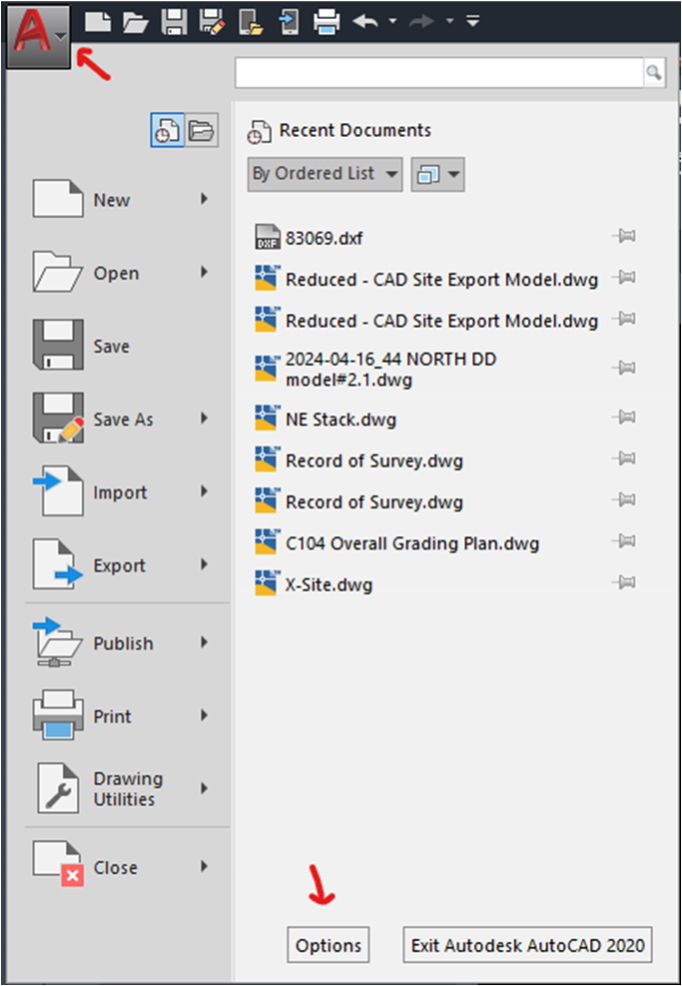
In AutoCAD a file must be open, even if it is a blank new file. Click on the A in the top left corner and then click Options.
Windows:
C:\Users\<user>\AppData\Roaming\Autodesk\AutoCAD 20xx\Rxx.x\enu\Plotters\Plot Styles
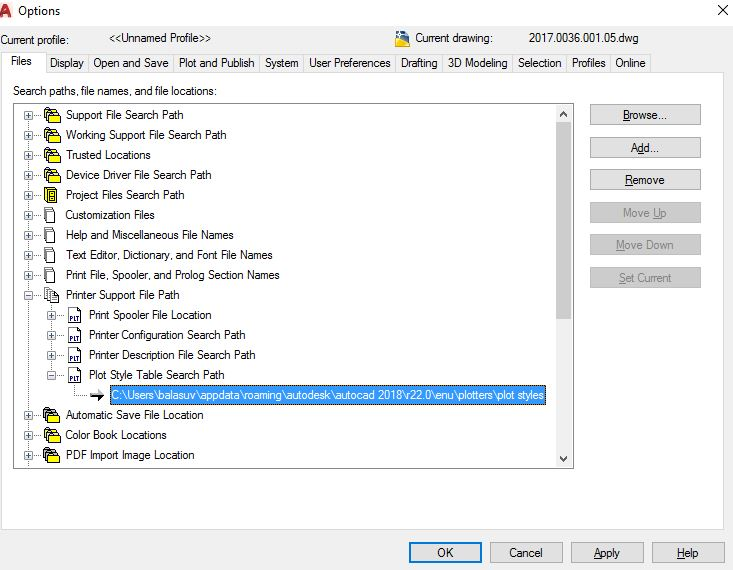
In the options dialogue box File tab under Printer Support File Path and then Plot Style Table Search Path. Select the path and either paste the network location or use the Browse button at the top to navigate to the folder location where the plot styles are located.
Notes:
- The x in Rxx.x stands for version number.
- If you have installed several AutoCAD-based products on the same computer, the path is most likely for each product differently.
- If you find only STB-files but no CTB-files in your plot dialog, then the drawing is configured to use only STB-plot styles.
- AutoCAD is able to access a plot style file if it is in the same folder as the drawing which uses it.
Create a new plot style table
- On the command line, type STYLESMANAGER.
- In the dialog double-click the icon “Add-A-Plot Style Table Wizard”.
- If you don’t see this icon, it was moved by your IT. You can get it back by creating a shortcut of styshwiz.exe, which can be found in the AutoCAD program folder. Copy this shortcut into the folder, where all the plot styles are saved.
- If you don’t see this icon, it was moved by your IT. You can get it back by creating a shortcut of styshwiz.exe, which can be found in the AutoCAD program folder. Copy this shortcut into the folder, where all the plot styles are saved.
- Follow the steps in the wizard to create a new plot style table.
Copy existing plot style tables
- On the command line, type STYLESMANAGER.
- Copy all CTB and STB files into this folder.
- If needed, close and reopen AutoCAD to refresh the plot style tables list in the PLOT dialog drop-down.
macOS:
/Users/<user>/Library/Application Support/Autodesk/AutoCAD version Standalone/Rxx.x/roaming/@enu@/Plotters/Plot Styles
