
• Home
  • IT Support
  • General Office
  • QX Support
Method Studio SupportMethod Studio Support
  • Home
  • IT Support
  • General Office
  • QX Support

AutoCAD: How to convert drawing from CTB to STB plot style

May 28, 2024 Autocad, BIM Apps, IT

Issue:

How to convert drawing files correctly in AutoCAD Products from being CTB based to STB, taking the possible warning messages into account, to ensure that the PDF or physical print output is displayed correctly.

Solution:

The entire process, at least when doing it the first time, is a two-part process consisting of two commands:

  • CONVERTPSTYLE
  • CONVERTCTB

If done in the wrong order  Warning messages will appear, such as:
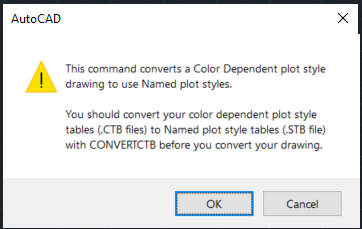
Note: This Warning message will always display as a reminder to have a proper STB, which can be used for the conversion process.
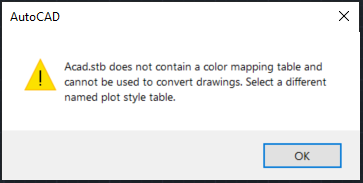
Note: If this warning message should appear, it means that the STB selected for the CONVERTPSTYLES command, does not contain any color mapping table information and therefore can’t be used.

The correct steps to follow are:

  1. Use the CONVERTCTB command.
  2. Select any CTB related plot style and save it with at a desired file location.
  3. Use the CONVERTPSTYLES command.
  4. Confirm the Warning message to open the file selection dialog box.
  5. Navigate to the previously created STB, select it and confirm with Open.

After that the drawing which previously was in Color Dependent Mode is now converted to Named plot style mode.

You also might be interested in

Microsoft Excel: How to select every other row or every nth row

Jun 11, 2024

In this article, we will explore different methods to select[...]

AutoCAD: To Export & Import Custom User Settings Between The Same Release

Apr 1, 2024

You can transfer custom settings between computers with the same[...]

Microsoft Excel: Turn table headers on or off

Jun 3, 2024

When you create an Excel table, a table Header Row is automatically added[...]

Contact Us

We're currently offline. Send us an email and we'll get back to you, asap.

Send Message

Pages

  • Admin Docs
  • General Office
  • Home
  • IT Support
  • QX Support

Categories

  • General Office
    • Food
    • Supplies
  • IT
    • Ajera
    • Barracuda Email Gateway
    • BIM Apps
      • Autocad
      • Bluebeam / Revu
      • Enscape
      • PyRevit
      • Revit
      • SketchUp
    • Computer Hardware
      • Monitors/Displays
      • Printing & Scanning
    • Cybersecurity
    • MacOS
    • Mobile Devices
    • Networking
    • Office 365
      • Excel
      • Microsoft Authenticator
      • OneDrive
      • Outlook
      • Teams
    • PDF
    • VPN & Remote Connection
    • Windows
      • Shortcuts

Recent Posts

  • Bluebeam: Missing Menu Bar or Toolbar
  • How to send Encrypted Email externally (outside the organization)
  • Enscape: already installed on this machine
  • PDF: How to open a PDF file
  • VPN: Understanding Virtual Private Networks (VPN)

2026 Method Studio

Prev Next