
• Home
  • IT Support
  • General Office
  • QX Support
Method Studio SupportMethod Studio Support
  • Home
  • IT Support
  • General Office
  • QX Support

RDP: Troubleshooting Remote Desktop Connection issues

March 15, 2024 IT, VPN & Remote Connection

Remote Desktop Connection Immediately Disconnects:

Known issues with Windows 10

If you are already signed in on a computer and then try to remote to the same computer without signing out, you will be denied access. If you are on a Windows 10 computer, make certain to sign out of the computer before attempting to remote to it.

If you’re already signed in on your computer (you have not signed out) and attempt to remote to it, and the computer immediately kicks you out. Attempt the following for your Method computer (when you are signed in and have access).

1. Please click Start (Windows 🪟 icon)

2. Type: View Advanced System Settings and open it.

3. Click the Remote tab and click Select Users.
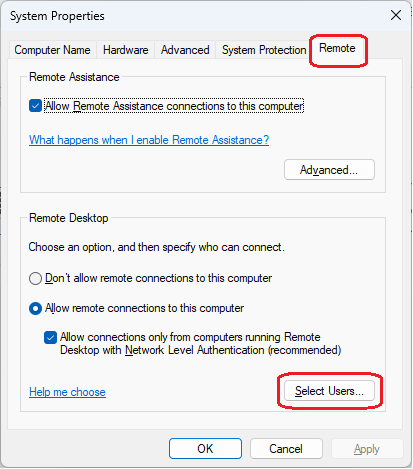
4. Click Add.
(Even though it says your username “already has access” you are going to add it anyway)
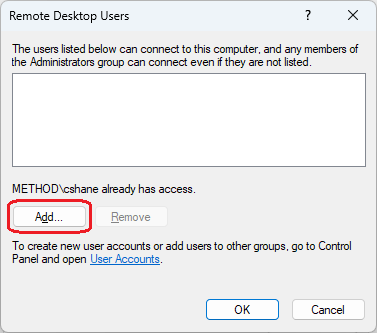
5. Type your username and click OK.
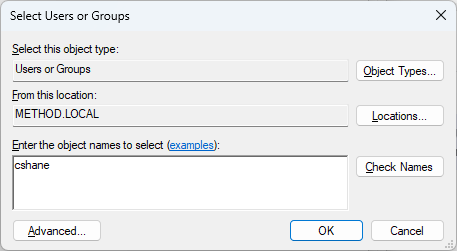
6. Click OK.

Once you’ve completed these steps, you should no longer have this issue.

However, if it continues, you can have IT remote to your computer and sign your account out. This will allow you to remote back, but any files or programs open; will not be saved.


Connect using the Fully Qualified Domain Name (FQDN):

Your computer may not always respond to the “nickname”, you may need to enter the FQDN.
Instead of entering MS137, enter MS137.method.local
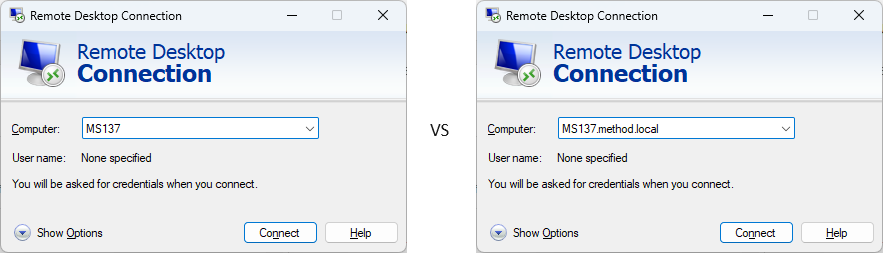
If this doesn’t work, there may be a DNS issue, contact IT and we can help you troubleshoot.

You also might be interested in

Outlook: Set up iOS Mail App for Outlook email account on an iPhone

Mar 15, 2024

How to add your Method Email account to the iOS[...]

AutoCAD: How to convert drawing from CTB to STB plot style

May 28, 2024

Issue: How to convert drawing files correctly in AutoCAD Products[...]

MacOS: Keyboard Shortcuts & Gestures for Safari

Dec 6, 2023

In the Safari app  on your Mac, you can quickly accomplish[...]

Contact Us

We're currently offline. Send us an email and we'll get back to you, asap.

Send Message

Pages

  • Admin Docs
  • General Office
  • Home
  • IT Support
  • QX Support

Categories

  • General Office
    • Food
    • Supplies
  • IT
    • Ajera
    • Barracuda Email Gateway
    • BIM Apps
      • Autocad
      • Bluebeam / Revu
      • Enscape
      • PyRevit
      • Revit
      • SketchUp
    • Computer Hardware
      • Monitors/Displays
      • Printing & Scanning
    • Cybersecurity
    • MacOS
    • Mobile Devices
    • Networking
    • Office 365
      • Excel
      • Microsoft Authenticator
      • OneDrive
      • Outlook
      • Teams
    • PDF
    • VPN & Remote Connection
    • Windows
      • Shortcuts

Recent Posts

  • Bluebeam: Missing Menu Bar or Toolbar
  • How to send Encrypted Email externally (outside the organization)
  • Enscape: already installed on this machine
  • PDF: How to open a PDF file
  • Enscape: How to activate Enscape using a license key

2025 Method Studio

Prev Next