
• Home
  • IT Support
  • General Office
  • QX Support
Method Studio SupportMethod Studio Support
  • Home
  • IT Support
  • General Office
  • QX Support

Microsoft Office: How to update your photo for Teams & Outlook

June 14, 2024 IT, Office 365, Outlook, Teams

Your photo in Teams is the same as Outlook (and other apps). In Teams meetings, when you do not have your camera on, this photo is shown (if you do not have a photo your initials are displayed).

When you send emails, if the recipient uses a Microsoft Office 365 account, they will see your photo (or initials). This should probably be a professional-looking photo rather than a silly casual one.

How to update through Microsoft Teams

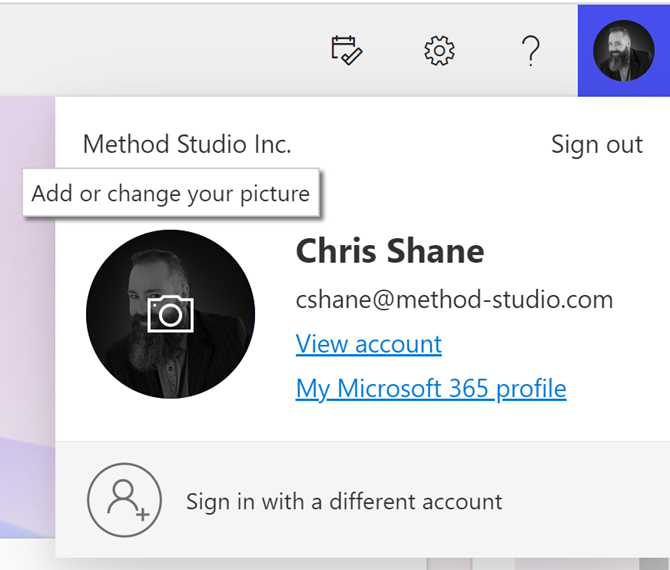
1. In Teams, click on your picture, move your pointer back over your picture and you will see a camera icon.

2. Click there again, and you should have the option to upload or remove.

3. Click Upload and navigate to the photo you wish to upload.


An alternative method to upload your photo through the internet

If you attempt to change your photo through Outlook or other desktop Microsoft apps, it will take you to the online version of Outlook. Below are instructions for updating the photo online.

1. Log into https://outlook.office.com/mail

2. Open Outlook

3. Click your picture in the top right corner

4. Move your pointer to your picture where you see the camera icon

5. You will get the opportunity to Add or Change your picture
You also might be interested in

Bluebeam: Missing Menu Bar or Toolbar

Mar 13, 2025

Missing Menu BarIf the top bar in Bluebeam Revu is[...]

Enscape: Enscape Crashes

Feb 23, 2024

When using Sketchup or Revit and trying to launch Enscape.[...]

Microsoft Excel: How to add an always visible Top Row in a table

Jun 3, 2024

To add an always-visible title, you can place it in[...]

Contact Us

We're currently offline. Send us an email and we'll get back to you, asap.

Send Message

Pages

  • Admin Docs
  • General Office
  • Home
  • IT Support
  • QX Support

Categories

  • General Office
    • Food
    • Supplies
  • IT
    • Ajera
    • Barracuda Email Gateway
    • BIM Apps
      • Autocad
      • Bluebeam / Revu
      • Enscape
      • PyRevit
      • Revit
      • SketchUp
    • Computer Hardware
      • Monitors/Displays
      • Printing & Scanning
    • Cybersecurity
    • MacOS
    • Mobile Devices
    • Networking
    • Office 365
      • Excel
      • Microsoft Authenticator
      • OneDrive
      • Outlook
      • Teams
    • PDF
    • VPN & Remote Connection
    • Windows
      • Shortcuts

Recent Posts

  • Bluebeam: Missing Menu Bar or Toolbar
  • How to send Encrypted Email externally (outside the organization)
  • Enscape: already installed on this machine
  • PDF: How to open a PDF file
  • Enscape: How to activate Enscape using a license key

2025 Method Studio

Prev Next