
• Home
  • IT Support
  • General Office
  • QX Support
Method Studio SupportMethod Studio Support
  • Home
  • IT Support
  • General Office
  • QX Support

Enscape: Enscape Crashes

February 23, 2024 BIM Apps, Enscape, IT

When using Sketchup or Revit and trying to launch Enscape. Enscape tries to open, gets to 5%, opens an Enscape loading page, and then disappears/crashes. Or you are trying to launch a stand-alone Enscape model .exe and it crashes. This article is for you.
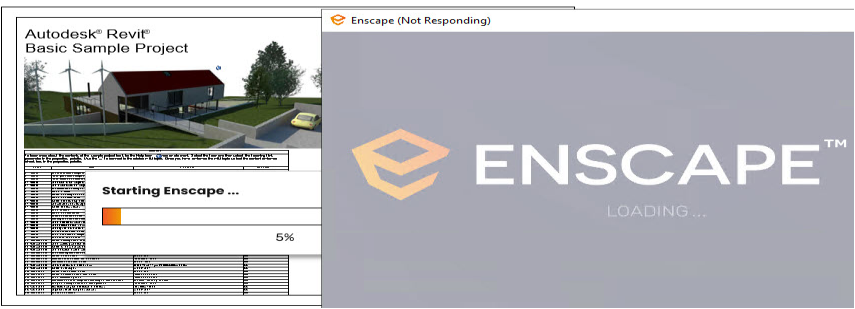
This is being caused by an installation of the OpenCL, OpenGL, and Vulkan Compatibility Pack. This is installed automatically with Nvidia Drivers as part of the Direct X12 installation.


How to fix for Windows 10 & 11:

Uninstall the OpenCL™, OpenGL®, and Vulkan® Compatibility Pack from Apps:

1. Click Start (Windows Icon/Key)
2. Open Settings
3. Select Apps
4. Select Installed Apps
5. Scroll down and find the OpenGL/CL Compatibility Pack
6. Right-click on the OpenGL/CL Compatibility Pack and select Uninstall
7. Follow the on-screen instructions to uninstall the OpenGL/CL Compatibility Pack 

*NOTE: You will not find it in the Control Panel > Programs & Features!


What is the Compatibility Pack?

This compatibility pack allows more of your favorite OpenCL™, OpenGL®, and Vulkan® apps to run on a Windows 10 or Windows 11 PC that doesn’t have these hardware drivers installed by default. If a DirectX 12 driver is installed, supported apps will run with hardware acceleration for better performance.
For more information, go here.

You also might be interested in

Revit: Can’t create new local model after moving central model to a new server

Apr 16, 2024

Issue: After moving the Revit central model to a new[...]

Enscape: How to activate Enscape using a license key

Aug 21, 2024

Note: The below is about Enscape version 4.0.2.11 and below.[...]

Microsoft Excel: Keyboard shortcuts

May 30, 2024

Do you find using a mouse to manage your Excel[...]

Contact Us

We're currently offline. Send us an email and we'll get back to you, asap.

Send Message

Pages

  • Admin Docs
  • General Office
  • Home
  • IT Support
  • QX Support

Categories

  • General Office
    • Food
    • Supplies
  • IT
    • Ajera
    • Barracuda Email Gateway
    • BIM Apps
      • Autocad
      • Bluebeam / Revu
      • Enscape
      • PyRevit
      • Revit
      • SketchUp
    • Computer Hardware
      • Monitors/Displays
      • Printing & Scanning
    • Cybersecurity
    • MacOS
    • Mobile Devices
    • Networking
    • Office 365
      • Excel
      • Microsoft Authenticator
      • OneDrive
      • Outlook
      • Teams
    • PDF
    • VPN & Remote Connection
    • Windows
      • Shortcuts

Recent Posts

  • Bluebeam: Missing Menu Bar or Toolbar
  • How to send Encrypted Email externally (outside the organization)
  • Enscape: already installed on this machine
  • PDF: How to open a PDF file
  • Enscape: How to activate Enscape using a license key

2025 Method Studio

Prev Next