
• Home
  • IT Support
  • General Office
  • QX Support
Method Studio SupportMethod Studio Support
  • Home
  • IT Support
  • General Office
  • QX Support

How to Connect to Method Shared Calendars

March 21, 2023 IT, Office 365, Outlook

In Outlook, click on Calendar

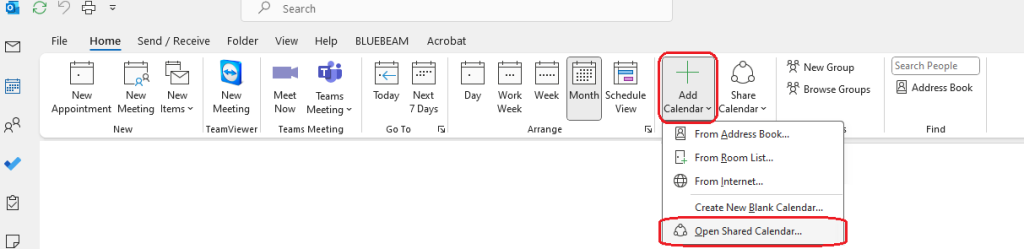
On the Ribbon, click Add Calendar, click Open Shared Calendar
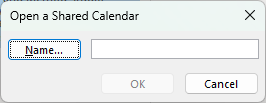
If you know the name of the calendar, you can type in the box, or you can click Name… to open the Global Address List in Outlook
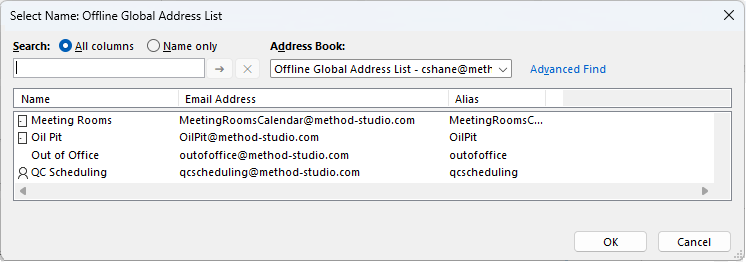
Select the calendar you wish to add and click OK
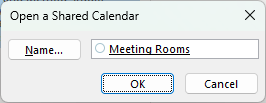
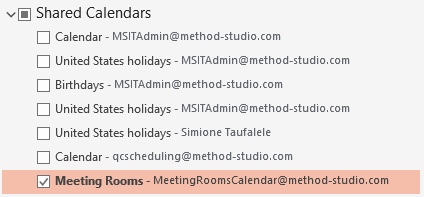
The calendar will now appear in your list of Shared Calendars that you can toggle on or off

Method Out of Office

To add the Method Out of Office calendar, follow these steps:

Click on More Apps -> Folders
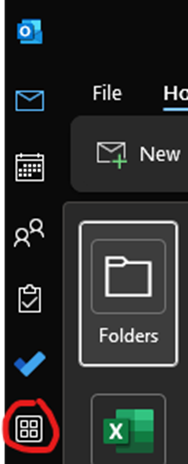
Scroll down until you see Public Folders – ‘youremailaddress’. Expand it and “All Public Folders”

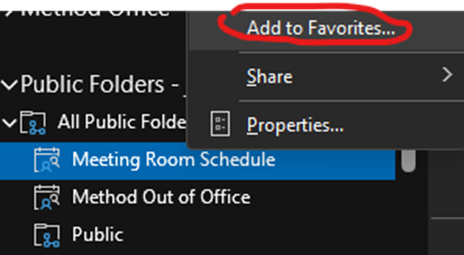
Right-click on “Meeting Room Schedule” and click “Add to favorites”

Do the same for “Method Out of Office” (right-click and add to favorites)
A reboot of Outlook may be required.

These shared calendars should show under “Other Calendars” in your Outlook calendar.

You also might be interested in

MacOS: Finder and System Shortcuts

Dec 5, 2023

Using Keyboard Shortcuts To use a keyboard shortcut, press and hold[...]

Windows: Desktop shortcuts

May 29, 2024

The following desktop keyboard shortcuts allows you to efficiently open,[...]

AutoCAD: To install plot style files (CTB and STB)

May 28, 2024

Method Specific Plot Styles: The two main locations for plot[...]

Contact Us

We're currently offline. Send us an email and we'll get back to you, asap.

Send Message

Pages

  • Admin Docs
  • General Office
  • Home
  • IT Support
  • QX Support

Categories

  • General Office
    • Food
    • Supplies
  • IT
    • Ajera
    • Barracuda Email Gateway
    • BIM Apps
      • Autocad
      • Bluebeam / Revu
      • Enscape
      • PyRevit
      • Revit
      • SketchUp
    • Computer Hardware
      • Monitors/Displays
      • Printing & Scanning
    • Cybersecurity
    • MacOS
    • Mobile Devices
    • Networking
    • Office 365
      • Excel
      • Microsoft Authenticator
      • OneDrive
      • Outlook
      • Teams
    • PDF
    • VPN & Remote Connection
    • Windows
      • Shortcuts

Recent Posts

  • Bluebeam: Missing Menu Bar or Toolbar
  • How to send Encrypted Email externally (outside the organization)
  • Enscape: already installed on this machine
  • PDF: How to open a PDF file
  • Enscape: How to activate Enscape using a license key

2025 Method Studio

Prev Next