• Home
  • IT Support
  • General Office
  • QX Support
Method Studio SupportMethod Studio Support
  • Home
  • IT Support
  • General Office
  • QX Support

Revit: Double-clicking RVT file does not open project in expected version

April 17, 2024 BIM Apps, IT, Revit

Issue:

When double-clicking an RVT file, the project doesn’t open in the desired version of Revit but in a different release.

Causes:

Windows is configured to use a different program for RVT files than expected/desired.

Solution:

To assign the desired version of Revit to open when double-clicking the RVT file, do one of the following:
 

Use the “Open with” option to choose a different program for that file type

  • Start Revit as an administrator to give Revit the ability to modify the default setting:
    • Right-click on the Revit Desktop Shortcut that you want to open RVT files.
    • Select Run as Administrator.
  • Use “Open with” to change the default:
    • With Revit still open, right-click a Revit model and click “Open with” > “Choose another app”
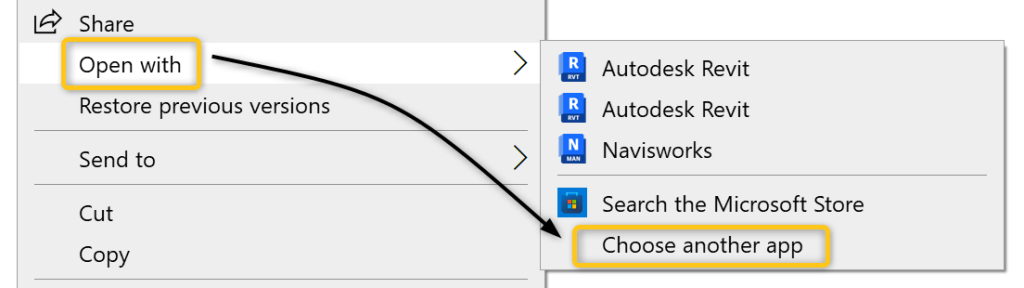
  • Check the box “Always use this app to open .rvt files.

  • Click the “More Apps” option.
  • Scroll to the bottom of the list, and click “Look for another app on this PC”.

  • Browse to the location of the Revit.exe (by default, it would be C:\Program Files\Autodesk\Revit <Version>).
  • Select Revit.exe and click Open.


Uninstall Revit associated with the RVT file

If the previous suggestion does not resolve the issue:

  1. Uninstall the Revit version that opens the RVT file by default. (RVT files should become unassociated.)
  2. Uninstall the desired version of default Revit.
  3. Install the desired version of Revit.
  4. (optionally) reinstall the version of Revit previously associated with the RVT file.

You also might be interested in

Cybersecurity: Public networks & Wi-fi Security

Jun 18, 2024

Public Wi-Fi is widely available, but it can also come[...]

Microsoft Excel: How to make pivot charts

Jun 11, 2024

The tutorial shows how to quickly create, filter and customize[...]

AutoCAD: To install plot style files (CTB and STB)

May 28, 2024

Method Specific Plot Styles: The two main locations for plot[...]

Contact Us

We're currently offline. Send us an email and we'll get back to you, asap.

Send Message

Pages

  • Admin Docs
  • General Office
  • Home
  • IT Support
  • QX Support

Categories

  • General Office
    • Food
    • Supplies
  • IT
    • Ajera
    • Barracuda Email Gateway
    • BIM Apps
      • Autocad
      • Bluebeam / Revu
      • Enscape
      • PyRevit
      • Revit
      • SketchUp
    • Computer Hardware
      • Monitors/Displays
      • Printing & Scanning
    • Cybersecurity
    • MacOS
    • Mobile Devices
    • Networking
    • Office 365
      • Excel
      • Microsoft Authenticator
      • OneDrive
      • Outlook
      • Teams
    • PDF
    • VPN & Remote Connection
    • Windows
      • Shortcuts

Recent Posts

  • Bluebeam: Missing Menu Bar or Toolbar
  • How to send Encrypted Email externally (outside the organization)
  • Enscape: already installed on this machine
  • PDF: How to open a PDF file
  • Enscape: How to activate Enscape using a license key

2025 Method Studio

Prev Next