
• Home
  • IT Support
  • General Office
  • QX Support
Method Studio SupportMethod Studio Support
  • Home
  • IT Support
  • General Office
  • QX Support

Outlook: How to set up the Microsoft Outlook Email Mobile App

March 18, 2024 IT, Mobile Devices

Your experience may look a little different from the pictures below depending on your type of phone.
However, the instructions should be similar between iPhones and various Android models.
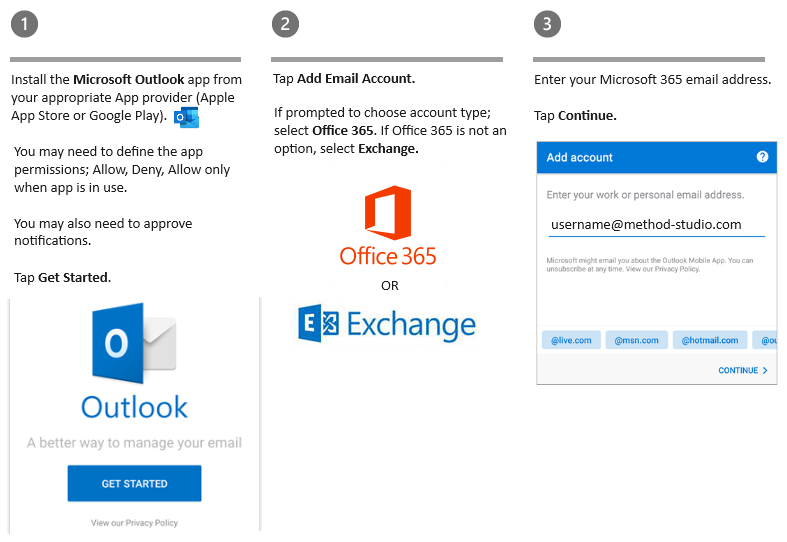
Set up email on an iPhone

  1. On iPhone, go to the App Store, search for Outlook, and install the Outlook app.
  2. Sign in with your Apple ID, if prompted.
  3. Open the app, tap Get Started, and choose to allow notifications.
  4. On the Add Account page, enter your Microsoft 365 email address and tap Add Account.
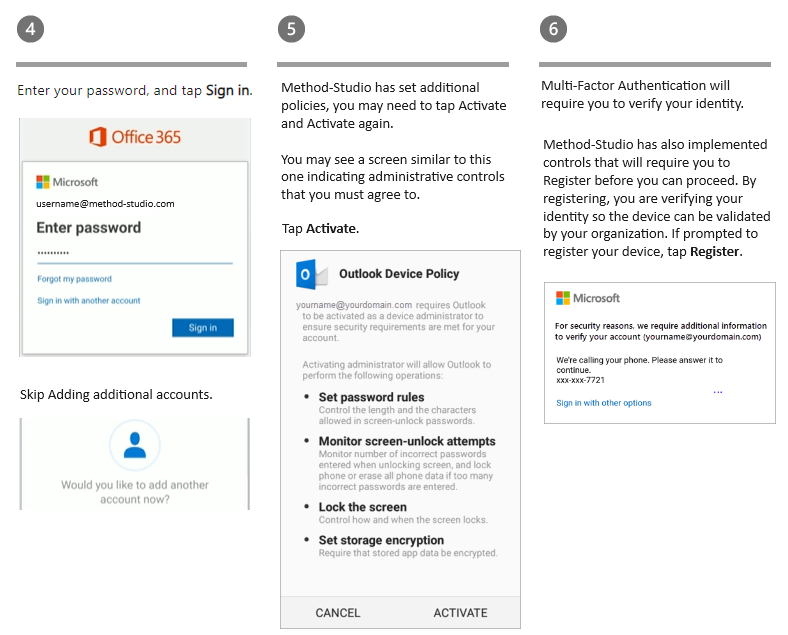
  5. Enter your password, and tap Sign in.
  6. Optionally, you can add more accounts, or tap Maybe Later.
  7. After swiping through the guided tour, you will see your email, calendar, and contacts in the Outlook mobile app.
  8. Registering device and Multi-Factor Authentication.

Set up email on an Android phone

  1. On Android, go to the Play Store, search for Outlook, and install the Outlook app.
  2. Open the app and tap Get Started.
  3. Enter your Microsoft 365 email address and password, and tap Sign in.
  4. Optionally, you can add more accounts, or tap Skip.
  5. After swiping through the guided tour, you will see your email, calendar, and contacts in the Outlook mobile app.
  6. Activesync approval.
  7. Registering device and Multi-Factor Authentication.

You also might be interested in

Microsoft Excel: How to print row and column headers on every page

Jun 3, 2024

In printing spreadsheets; the top row is printed only on[...]

Microsoft Excel: Text to Columns

Jun 3, 2024

Data imported from other spreadsheets or databases is already separated[...]

MacOS: Common Shortcuts & Commands

Dec 5, 2023

By pressing certain key combinations, you can do things that[...]

Contact Us

We're currently offline. Send us an email and we'll get back to you, asap.

Send Message

Pages

  • Admin Docs
  • General Office
  • Home
  • IT Support
  • QX Support

Categories

  • General Office
    • Food
    • Supplies
  • IT
    • Ajera
    • Barracuda Email Gateway
    • BIM Apps
      • Autocad
      • Bluebeam / Revu
      • Enscape
      • PyRevit
      • Revit
      • SketchUp
    • Computer Hardware
      • Monitors/Displays
      • Printing & Scanning
    • Cybersecurity
    • MacOS
    • Mobile Devices
    • Networking
    • Office 365
      • Excel
      • Microsoft Authenticator
      • OneDrive
      • Outlook
      • Teams
    • PDF
    • VPN & Remote Connection
    • Windows
      • Shortcuts

Recent Posts

  • Bluebeam: Missing Menu Bar or Toolbar
  • How to send Encrypted Email externally (outside the organization)
  • Enscape: already installed on this machine
  • PDF: How to open a PDF file
  • Enscape: How to activate Enscape using a license key

2026 Method Studio

Prev Next